
Collection
-
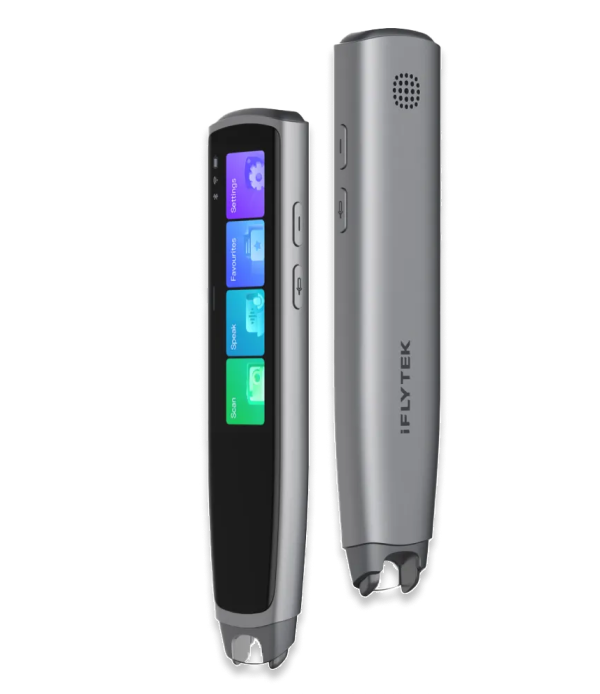 iFLYTEK Smart Dictionary Pen
iFLYTEK Smart Dictionary Pen
Your pocket-sized language expert
$199.99 USD
Unboxing the iFLYTEK AINOTE Air 2
Getting Started with iFLYTEK AINOTE Air 2
How to replace the pen refill for iFLYTEK AINOTE
How to replace the protective case for iFLYTEK AINOTE
How to Record, Transcribe, and Translate in Real-Time on iFLYTEK AINOTE Air2
How to Write and Convert Handwriting to Text on iFLYTEK AINOTE Air2
How to Read or Listen to Books on iFLYTEK AINOTE Air2
How to Manage Your Schedule on iFLYTEK AINOTE Air2
How to share and export meeting content and audio
How to Sync and Review Notes on Your Phone with iFLYTEK AINOTE Air2
How to Complete Google Play Certification on iFLYTEK AINOTE Air 2
How to Create with Different Pen Styles
How to Boost Productivity with the Smart Pen
How to Use ChatGPT for AI-Generated Summaries and more
How to View FAQs and Submit Feedback in iFLYTEK AINOTE
How to Sync Data Between Google Calendar and iFLYTEK AINOTE Air 2
What Is a Translation Pen and How Does It Work?
What Is a Translation Pen and How Does It Work?
A translation pen uses OCR technology to recognize printed text as you move the scanning tip across a word, phrase, or sentence. The iFLYTEK Smart Dictionary Pen then displays the pronunciation, definition, example sentences, or translation on its screen, reducing the need to type unfamiliar words into a phone or search through a paper dictionary.
Which Languages Does the iFLYTEK Translator Pen Support?
Which Languages Does the iFLYTEK Translator Pen Support?
When connected to the internet, the iFLYTEK Translator Pen supports 21 languages, including English, German, French, Spanish, Italian, Russian, Arabic, Japanese, Korean, Simplified Chinese, and Traditional Chinese. Available translation directions may depend on the selected language and function, so users who need a particular language combination should check the latest supported-language list before purchasing.
Can the Dictionary Pen Work Without Wi-Fi?
Can the Dictionary Pen Work Without Wi-Fi?
Yes. The Dictionary Pen supports selected English and Chinese scanning functions without an internet connection, as well as offline English pronunciation evaluation. Connecting to Wi-Fi provides access to the broader set of supported languages and online translation features.
What Types of Text Can the Smart Dictionary Pen Scan?
What Types of Text Can the Smart Dictionary Pen Scan?
The Smart Dictionary Pen is designed primarily for textbooks, exercise books, newspapers, magazines, and other printed materials. It supports common fonts from approximately 7.5 pt to 26 pt and can recognize clear handwriting, although neat horizontal text usually produces better results than irregular handwriting or vertical scanning. Some digital screens may also be scannable, but recognition can vary with screen brightness, display technology, font size, and reflections.
Can the Translator Pen Translate Spoken Language?
Can the Translator Pen Translate Spoken Language?
Yes. In Speak Mode, users can press and hold the voice button, speak a word or sentence, and view the translation on the screen. Spoken translation supports additional languages when the device is online, while offline voice translation is limited to selected English and Chinese functions.
Can a Translation Pen Help Improve English Pronunciation?
Can a Translation Pen Help Improve English Pronunciation?
Yes. After scanning an English word, phrase, or sentence, users can listen to its pronunciation and complete a pronunciation assessment. The device evaluates areas such as accuracy, fluency, completeness, and standardness, and users can choose between British and American English pronunciation in the settings. English pronunciation assessment can be used offline, while Chinese assessment requires an internet connection.
Can Left-Handed Users Use the iFLYTEK Dictionary Pen?
Can Left-Handed Users Use the iFLYTEK Dictionary Pen?
Yes. The device includes settings for both right-handed and left-handed operation. Changing the pen-holding direction rotates the screen and adjusts the scanning orientation, although users should select the correct setting before scanning to improve recognition.
Can I Connect Bluetooth Earphones to the Dictionary Pen?
Can I Connect Bluetooth Earphones to the Dictionary Pen?
Yes. The Dictionary Pen can connect to compatible Bluetooth earphones and speakers using Bluetooth 4.2 or later. It does not connect to a phone as a standard Bluetooth accessory, and earphones already paired with another device may need to be disconnected before pairing with the pen.
How Long Does the iFLYTEK Translation Pen Battery Last?
How Long Does the iFLYTEK Translation Pen Battery Last?
The iFLYTEK Translation Pen has a 1,100mAh battery and provides approximately four to six hours of use on one charge. Continuous scanning, voice translation, pronunciation assessment, high screen brightness, and an active network connection may reduce the actual battery life.
What is the return and exchange policy for a smart dictionary pen?
We offer a 30-day satisfaction guarantee for customers who purchase the iFLYTEK Dictionary Pen from our official store, allowing you to try it risk-free. If it’s not the right fit, you can request a full refund within 30 days of delivery. The dictionary pen must be in good condition with all accessories and packaging included. Many customers also pair it with a digital notebook for enhanced study efficiency, creating a complete smart learning experience.