
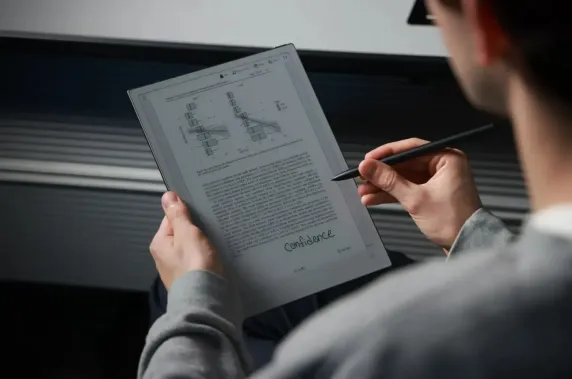
When closing your eyes, do they feel "gritty" or dry? After a long day of staring atspreadsheets, does the text on your phone start to blur? You aren’t alone. Most of us spendmore than 12 hours a day staring directly into what are essentially high-intensity lightscreens. This constant "light-beaming" is why our eyes feel exhausted by dinner time.
But what if a screen didn’t shine at you? That is the magic of E Ink. E Ink is easier on the eyes, not because the technology is more advanced, but because it doesn’t emit light, causes less strain, and its display is closer to real paper, better fitting the natural reading habits of the human eye. Now, this article explores why E Ink protects your eyes, compares it with LCD/OLED, and recommends the best E Ink devices for your sustainable work.
Why E Ink Is Easier on Your Eyes
To understand why E Ink feels so much more comfortable, we have to look at how it interacts with light. Unlike traditional screens that fight against the environment, E Ink works with it.
E Ink Does Not Emit Direct Light
Traditional displays (LCD and OLED) are emissive. This means they shine light directly into your retinas to create an image. Imagine staring at a tiny flashlight for six hours. That is essentially what you are doing when you use a smartphone or tablet.
E Ink is reflective. It uses tiny microcapsules filled with black and white particles. When you look at an E Ink screen, you are seeing light bounce off the surface, just like you do with a physical book. Because there is no light punching through the display into your eyes, the physiological stress on your visual system issignificantly reduced.
No Backlight Flicker or PWM Dimming
Many LCD and OLED screens control brightness through Pulse Width Modulation (PWM). This technique involves flickering the backlight on and off at very high speeds. While your brain might not "see" the flicker, your pupils are constantly dilating and contracting in response to it, leading to headaches and eye fatigue.
E Ink screens arestable. Once an image is set on the screen, it stays there without needing any power or refreshing. There is zero flicker, providing a rock-steady image that allows your eye muscles to relax.
A Stable, Non-Refreshing Image
On a standard computer monitor, the screen refreshes roughly 60 to 120 times per second (60Hz - 120Hz). This constant motion, even when viewing a static PDF, creates a subtle "shimmer" that contributes to cognitive load.
E Ink only uses energy and "moves" when you turn a page. Between page turns, the image is as static as ink on a page. This stability prevents the micro-movements of the eye that lead to exhaustion during long-form reading.
Lower Visual Stimulation and Contrast Stress
OLED screens are famous for "hyper-vibrant" colors and blinding whites. While great for watching movies, this high intensity is like someone shouting at your eyes. It overstimulates the macula (the sensitive center of your retina).
E Ink operates in the "Goldilocks zone." It uses a soft grayscale spectrum that mimics the natural contrast of a printed paperback. It provides a "quiet" visual experience that doesn't overwhelm your brain, making it much easier to focus on the content rather than the brightness.
E Ink vs LCD and OLED: Eye Comfort Compared
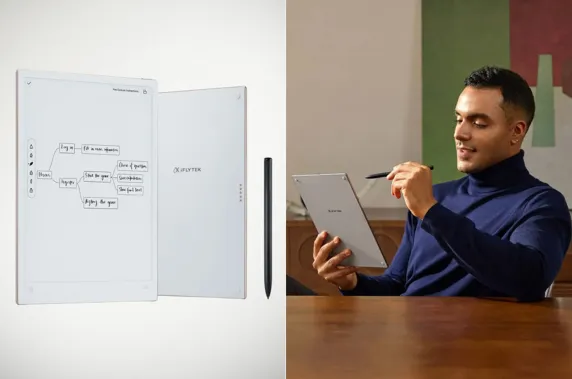
To help you see the difference at a glance, here is a comparison of how these technologies treat your eyes. While LCD and OLED are built for "wow factor" and speed, E Ink is built for long-term health and comfort.
|
Feature |
E Ink |
LCD (Liquid Crystal) |
OLED (Organic LED) |
|
Light Source |
Reflective (Ambient Light) |
Backlit (LED Panel) |
Emissive (Self-lit Pixels) |
|
Blue Light |
Minimal to None |
High |
Moderate to High |
|
Flicker (PWM) |
None |
Common |
Very Common |
|
Glare |
Matte / Anti-glare |
Glossy / High Reflection |
High Reflection |
|
Best Use Case |
Deep Reading & Notes |
Gaming & Video |
Professional Photo/Video |
How to Choose the Best E Ink Device for Daily Reading and Note-Taking?
If you've decided to make the switch to an E Ink tablet for long-term eye health, the vast array of products on the market can make choosing a difficult task. The following three aspects can serve as a reference for you.
Screen Size: A 6-inch screen is pocket-friendly for novels, but a 10+ inch screen is essential for reading PDFs comfortably and providing enough space for daily note-taking and sketching.
Writing Latency: For a natural feel, look for low latency. This ensures the digital ink flows instantly as your pen moves, preventing the distracting "lag" found onnormal devices.
Ecosystem & Apps: Decide if you need an "open" system. This allows you to install third-party apps like Google Drive for syncing files or Libby for borrowing library books.
Smart AI Features: Premium devices now offer AI transcription and real-time translation. These tools are game-changers for professionals who need to turn meeting recordings into organized, searchable text.
Top E Ink Device for Daily Use: iFLYTEK AINOTE Series
If you’re looking for a device that saves your eyes without slowing down your work, iFLYTEK is the brand to watch. Their AINOTE series moves beyond simple reading; these are high-performance "digital paper" tablets built to streamline the modern office. The following shows how the two products perform under different usage scenarios.
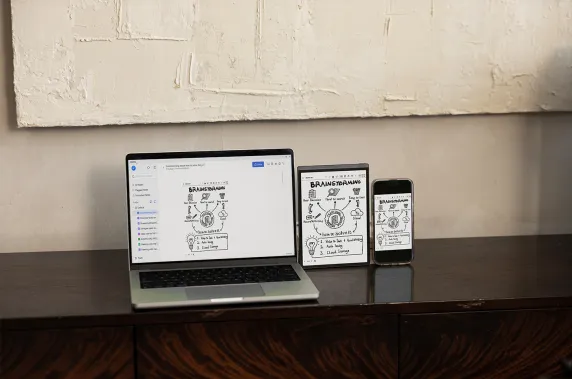
iFLYTEK AINOTE 2
The iFLYTEK AINOTE 2 is the powerhouse for heavy-duty office work. Featuring a large, paper-like display, it is designed for those who spend hours reviewing documents.
The "Back-to-Back" Corporate Meeting Marathon
Instead of staring at an LCD screen to type notes, the iFLYTEK AINOTE 2 allows you to stay engaged and maintain eye contact. The ultra-low writing latency ensures you can keep up with fast-paced discussions, while the 10.65-inch screen provides enough space to organize complex action items without the dry-eye sensation of a standard tablet.
The Cross-Border Executive
The GPT-5-powered transcription is a lifesaver for international calls. It can transcribe and summarize meetings in 133 languages. Instead of squinting at a bright monitor to manually translate or summarize notes, the AI handles the heavy lifting. You can review professional summaries on a paper-like surface, making global collaboration much more physically comfortable.
iFLYTEK AINOTE Air 2
If you are a professional on the move, a frequent traveler, a journalist, or a student, the iFLYTEK AINOTE Air 2 is your ideal companion. It takes the advanced AI of the larger series and packs it into a sleek, 8.2-inch frame that fits perfectly in one hand.
The "On-the-Go" Interview or Coffee Meeting
When you're meeting a client at a cafe or conducting a quick interview, a bulky laptop creates a barrier. The Air 2 is small and discreet. With its 88.5% screen-to-body ratio, you get a maximized writing surface in a compact body. The ultra-low latency handwriting allows you to scribble notes as fast as the conversation flows, feeling exactly like a high-end paper notepad.
The "Commuter" Brainstorming Session
Inspiration often strikes when you aren't at your desk. Because it’s lightweight and portable, the Air 2 is easy to pull out on a train or plane. You canalso use symbol-based tagging, like drawing a star next to a brilliant ideato instantly flag to-do items. Secure cloud sync with the AINOTE mobile app provides access across multiple devices, ensuring your notes are never lost.
Conclusion
E Ink technology is a rare example of "less is more." By removing the backlight, the flicker, and the constant refreshing of traditional screens, E Ink returns us to a more biological way of consuming information. It’s not about having the flashiest display; it’s about protecting your most valuable sensory asset: your vision.
If your job or hobbies require you to read for hours on end, transitioning to an E Ink device like the iFLYTEK AINOTE series isn't just a tech upgrade, but an investment in your long-term health.
FAQs About E Ink and Eye Comfort
-
Is E Ink really safer for your eyes?
Yes, by eliminating direct "flashlight" glare and flicker, it removes the primary triggers of digital eye strain and retinal stress.
-
Does E Ink reduce eye strain or just feel different?
Both; it feels like paper while allowing your eye muscles to remain relaxed instead of constantly fighting harsh screen glare.
-
Is E Ink better for kids or students?
Absolutely, as it protects developing eyes from excessive blue light and helps reduce the risk of early-onset nearsightedness.
-
Can E Ink cause eye fatigue over time?
Any prolonged close-up reading causes some fatigue, but E Ink delays this significantly compared to glowing smartphone or tablet screens.
-
Is E Ink better than paper-like LCD screens?
Yes; "paper-like" LCDs are still light bulbs with matte stickers, whereas E Ink mimics the physical, reflective properties of real paper.



