
-1944x.jpg?w=1450&h=960)
Messy notes are not just a matter of appearance. They can slow down your review, obscure key points, and often force you to reorganize them later. Clear, organized, and practical notes are especially important for students, professionals, and anyone who takes notes every day.
Fortunately, the iFLYTEK AINOTE 2 acts as a powerful all-in-one assistant, combining the familiar, paper-like writing experience with the processing power of advanced AI. To help you transform messy notes into a highly efficient external brain, here are six simple tips for taking neater, more effective notes.
Use Clear Note Structures Before You Start Writing
Imagine this: it’s finals week, and you’re lost in fifty pages of messy notes. You know the exam answer is in there somewhere, but withouta clear layout, it’s just one long, impossible wall of text.
The secret to a neat note isn't your handwriting, but the structure. Research suggests that 80% of note clarity is determined before the pen even touches the surface. With iFLYTEK AINOTE 2,the massive 10.65-inch screen provides the "breathing room" required for structured layouts like the Cornell Method or Mind Mapping. One of the major benefits of E Ink-based handwriting electronic notebooks like the iFLYTEK AINOTE 2 is how naturally they replicate the paper-writing experience. The E Ink screen offers a smooth, realistic pen-on-paper feel that's easy on the eyes and minimizes distraction.
This is one of the reasons many users start asking whether the iFLYTEK AINOTE 2 is worth itfor serious study or work. As an E Ink–based handwriting notebook, it closely replicates the paper-writing experience. The non-backlit E Ink screen delivers a smooth, realistic pen-on-paper feel that’s easy on the eyes and keeps visual distractions to a minimum.
Use Templates to Avoid Blank-Page Confusion
Have you ever had a moment where you stared at a blank screen while a fast-paced meeting had already started? Without a clear plan or outline, you hesitated, missed the first few key points, and ended up with a disorganized mess.
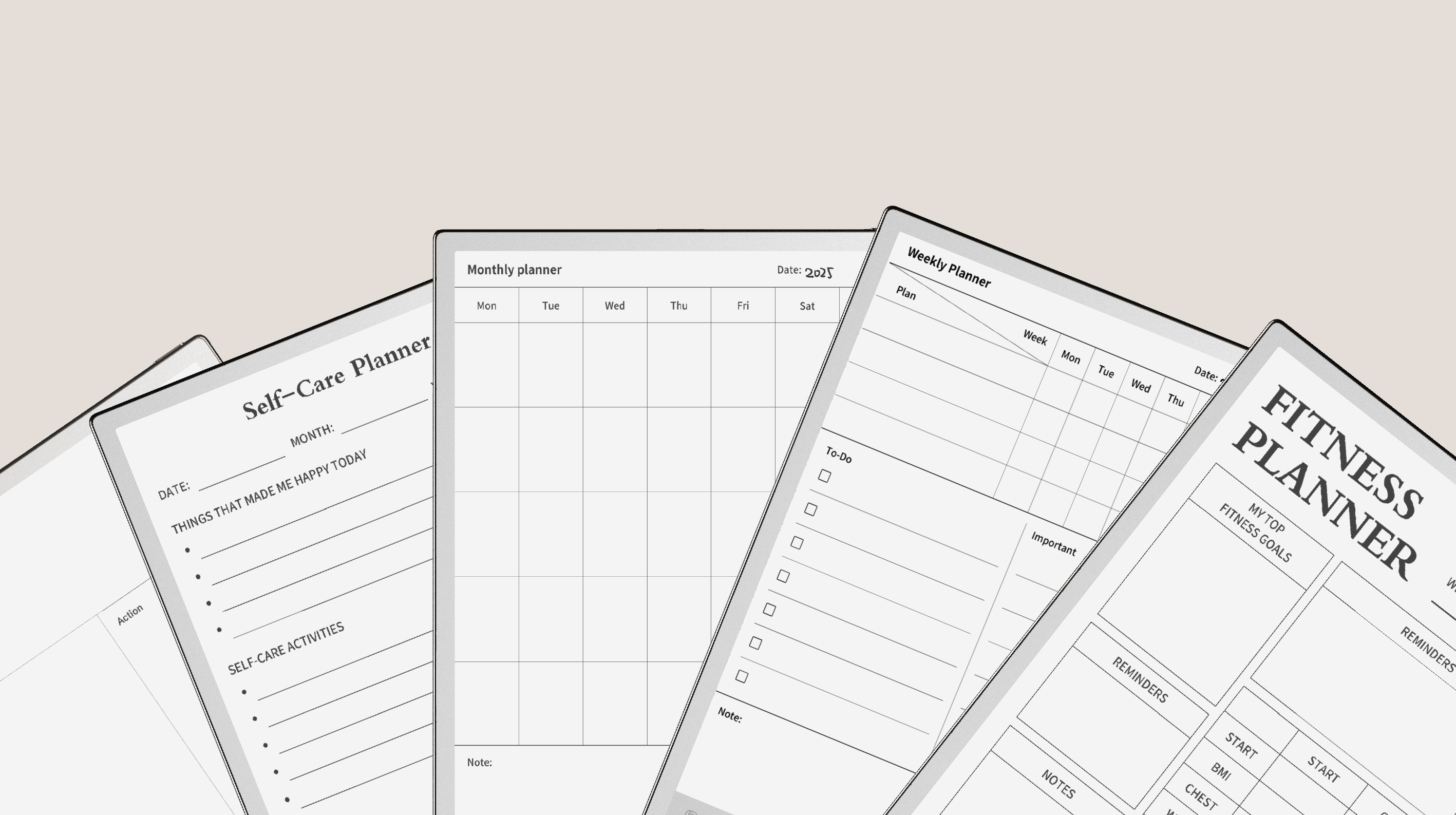
The iFLYTEK AINOTE 2 solves this by offering over 80 specialized templates ranging from Cornell notes and weekly planners to specialized formats for medical, legal, and engineering fields.By using a template, the "neatness" is hard-coded into your page. You don't have to worry about drawing straight lines; the device does it for you. This allows you to focus entirely on the content while thedevice handles the aesthetics and organization.
This allows you to focus entirely on capturing ideas and insights, while the iFLYTEK system ensures your notes remain clean, structured, and consistent.
Write Less by Letting AI Capture the Details
Trying to write down every word usually leads to messy notes and mental overload. You’re so focused on keeping up that you lose eye contact, miss context, and struggle to process what’s actually being discussed.
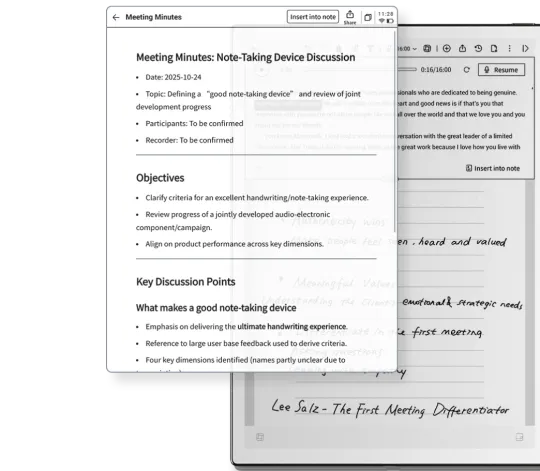
With iFLYTEK AINOTE 2, you don’t have to act like a stenographer anymore. Powered by advanced AI comparable to GPT-5-level intelligence, this e-ink tablet supports industry-leading real-time transcription. While the AI captures the full conversation, you can use handwriting only for high-level summaries, key decisions, personal insights, or diagrams.
Afterward, the system goes beyond raw transcripts by generating AI Meeting Minutes that condense long discussions into clear, actionable summaries. As a result, your handwritten notes stay concise and readable, focused only on what truly matters.
Separate Main Ideas, Details, and Action Items Visually
When you review your notes, everything gets mixed together. It's hard to distinguish details from key points, which can easily lead to missing important information and reduce the efficiency of studying and working.
Good notes are those that are well-structured and highlight the key points.To achieve this, you need visual hierarchy. Thanks to the ultra-low latency of the iFLYTEK AINOTE 2, the digital ink flows as fast as your thoughts, allowing for switching between styles.
8 different brush designs cater to your preferred writing styles,ideal for various occasions and note-taking purposes. Use the multiple brush settings to create a visual system, such as:
Bold Fountain Pen: For primary headings.
Fine Liner: For supporting details.
Highlighter: To mark critical deadlines.
Organize Notes Immediately with OCR and AI Search
The biggest problem with paper is that you can't search it.Having hundreds of "neat" pages is useless if you can’t find the specific one you need three months later.
The iFLYTEK AINOTE 2 can turn your handwriting into data using powerful OCR (Optical Character Recognition). It can recognize your handwritten content and index it, making your handwriting as searchable as a Word document.
One of the most intuitive features is AI Search by Circle. If you remember a specific diagram or a keyword but can't remember which notebook it’s in, you can use the AI search functions to locate it instantly. This means you can stop digging through messy old notebooks or paper files and ensure your digital library remains tidy and accessible.
Turn Notes into Tasks and Schedules Instantly
Many people always write down a deadline in their notes, but then forget to check that page again because your notebook isn't connected to your calendar, and you end up missing the task entirely.
Note-taking is only "effective" if it leads to action. The iFLYTEK AINOTE 2 bridges the gap between writing and doing. When you put down a task during a meeting, the system’s Smart Task Recognition can identify it as an actionable item.
You can sync these tasks directly with your digital schedule. This means your neat handwritten list automatically populates your professional calendar. It removes the clutter of post-it notes and scrap paper reminders, keeping your workspaceand your mindentirely clear.
Conclusion
Neat notes are not about having perfect calligraphy; they are about using the right tools to give your thoughts a logical home. The iFLYTEK AINOTE 2 serves as more than just a tablet; it’s a productivity partner that handles the heavy lifting of organization, transcription, and synthesis. By making the most of iFLYTEK AINOTE 2according to the tips above , you can finally enjoy the focus of paper with the limitless efficiency of the digital age.
With its large E Ink display, flexible templates, AI transcription, and deep search capabilities, the iFLYTEK AINOTE 2 stands out as one of the most practical contenders for the best E Ink Android tablet for professionals and students who care about clarity, efficiency, and long-term productivity.
FAQs
1. How do I take neat notes digitally without rewriting everything?
Let the AI capture every word with real-time transcription. Use your pen only for key insights and summaries. This keeps your pages clean while the AI handles the messy details.
2. Are digital notes as effective as handwritten notes?
Yes! You get the memory benefits of writing by hand, but with AI powers. Your handwritten notes become searchable, shareable, and sync directly to your digital calendar for better productivity.
3. What makes E Ink tablets better for note-taking than regular tablets?
Regular tablets are slippery and cause eye strain. The iFLYTEK AINOTE 2’s E Ink screen feels like real paper, providing the right friction for neater handwriting and a glare-free screen that is easy on the eyes.
4. How can I keep long-term notes organized on an E Ink tablet?
Stop digging through old notebooks. Use AI search to find any keyword in your handwriting instantly. You can also organize files into folders and sync everything securely to the cloud.
5. Is iFLYTEK AINOTE 2 suitable for daily note-taking?
Absolutely. It is the world’s thinnest AI tablet, making it easy to carry. With 80+ templates and Google Play support, it handles everything from quick lists to professional meeting minutes.



