

Are you tired of dealing with piles of notebooks, loose papers, and printed handouts? They can clutter your desk, backpack, or workspace. Losing important notes before an exam or searching through stacks of documents at work is stressful and time-consuming. Going paperless can help. It makes studying easier, work more efficient, and collaboration smoother. With a digital approach, you can keep everything organized, access files anytime, and reduce paper clutter. This guide will show the main benefits of going paperless and give practical tips for students and professionals.
Key Benefits of a Paperless Lifestyle
Making the switch to digital comes with a host of advantages that can transform both your productivity and your peace of mind.
Better Organization and Easy Access Across Devices
With a paperless system, all your notes, assignments, and files are stored in one digital place. You can tag, search, and organize them easily. This makes finding what you need fast and simple. Your files are also accessible on any device, including a laptop, tablet, or smartphone. You can work or study anywhere, whether in a library, coffee shop, or meeting room.
Real-Time Collaboration and Sharing
Digital documents remove the limits of paper. You can work with others at the same time. Everyone can edit and comment together. Sharing files is easy; you just need to send a link. You do not need to print, scan, or mail papers. This saves time and keeps everyone on the latest version.
Reduced Clutter and Eco-Friendly Habits
The biggest benefit of going paperless is less clutter. A clean workspace helps you focus better. It also helps the environment. Using less paper saves trees and water. It also reduces the carbon footprint from making and moving paper
How to Go Paperless in Your Studies
The benefits of going paperless can be applied both in your studies and your professional life. For students, the paperless revolution offers a way to streamline everything from lectures to final exams. Say goodbye to heavy backpacks and messy binders, and hello to a more efficient way to learn.
Digital Textbooks, E-Ink Readers, and Online Note Platforms
Start by using digital versions instead of heavy textbooks. E-ink readers are comfortable and easy on the eyes for long reading sessions. For taking notes, use platforms like Evernote, Notion, or OneNote. These let you create, organize, and search your notes easily. You can also use a digital notebook or a smart pen on a tablet. It can turn your handwriting into searchable text, giving you the benefits of both traditional writing and digital convenience.
Using Cloud Storage for Assignments and Group Projects
Cloud services like Google Drive, Dropbox, and OneDrive are very useful for paperless students. They keep your assignments, class materials, and research safe in one place. For group projects, you can use a shared folder. Everyone can access and edit documents at the same time. This works no matter where they are. It makes teamwork easier and keeps everyone up to date.
Recommended Tool: iFLYTEK Smart Dictionary Pen
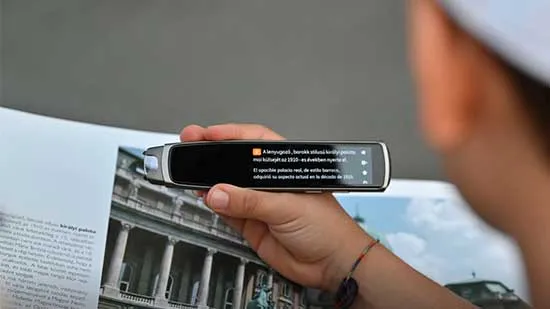
The iFLYTEK Smart Dictionary Pen is a useful tool for students, travelers, and professionals. It helps you study without paper. This small device can scan words, phrases, or full sentences from textbooks, notes, or printed materials. It gives fast and accurate translations, definitions, and pronunciations. The pen has AI-powered OCR and uses the Collins Dictionary. It supports many languages, including English, Chinese, German, French, Spanish, Japanese, and Korean. It gives real-time pronunciation feedback to help improve speaking. You can use it offline, so it works without Wi-Fi. The pen is lightweight and rechargeable. It helps students study efficiently without heavy dictionaries or constant phone use.
How to Go Paperless in Your Career
The paperless approach in the workplace is about modernization, collaboration, and security.
Digital Note-Taking in Meetings and Project Planning
Stop using notebooks and sticky notes. Use a digital notebook or a tablet with a stylus to take notes in meetings. You can organize your thoughts easily and add images or diagrams. You can also share your notes instantly with others. Project planning apps like Asana or Trello give a digital space to manage tasks, deadlines, and team communication. This removes the need for physical project boards.
Managing Tasks, Contracts, and Documents in a Cloud Workspace
Keeping all your work documents in a cloud-based workspace is key to a paperless career. Services like Google Workspace and Microsoft 365 help you manage documents, sign contracts, and share files securely. This keeps sensitive information safe and easy for authorized people to access. It also reduces the need for physical storage.
Recommended Tool: iFLYTEK AINOTE Air 2
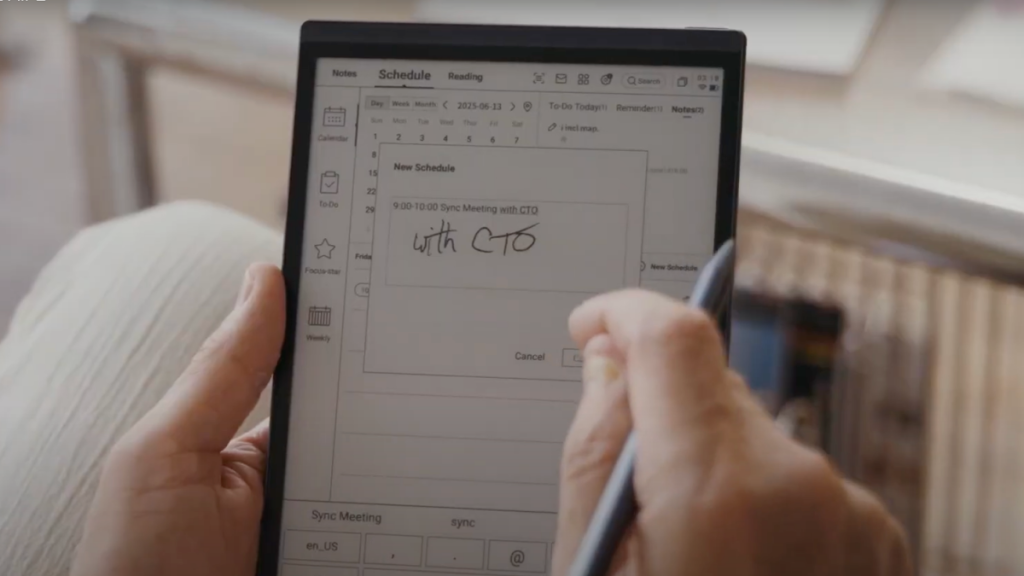
The iFLYTEK AINOTE Air 2 is great for professionals who need to capture ideas and meeting details on the go. It improves workplace productivity and supports a fully paperless workflow. You can take digital notes on its 8.2-inch E-Ink screen, which feels like real paper. It provides AI-powered meeting summaries and real-time voice-to-text transcription in 15 languages.
Handwritten notes can be converted into text in 83 languages. The smart task management lets you create to-dos, set priorities, annotate, and convert images into notes. Cloud sync keeps your files secure and accessible on any device. AI-powered search with ChatGPT-4 helps you find key information quickly. The AINOTE Air 2 is lightweight and portable. It keeps your meetings, projects, and documents organized, efficient, and fully digital.
FAQs
How do I deal with physical documents I already have?
The best way is to digitize your documents. Use a scanner app on your phone to make digital copies. Then, organize the copies in your cloud storage. After that, you can shred the physical papers. Start with a few documents at a time to avoid feeling overwhelmed.
Is going paperless secure?
Yes, going paperless can be more secure. Cloud services use strong encryption to protect your data. Physical documents can be lost, stolen, or damaged in a fire. Digital files can be backed up and restored. This keeps your information safe.
What's the best way to sign documents without paper?
You can use e-signature platforms like Adobe Sign or DocuSign. They are legally binding and widely accepted. Many cloud storage services also have tools to add your signature directly to a document.
Final Word
Going paperless takes time. You cannot do it all at once. It needs new habits and the use of new tools. Take small, steady steps. Students and professionals can both benefit. You can become more organized and efficient. You can also live more sustainably. The benefits are clear: less clutter, better collaboration, and the ability to work anywhere. With the help of smart solutions like iFLYTEK, going paperless becomes even easier and more effective. It is good for you and the planet.



