
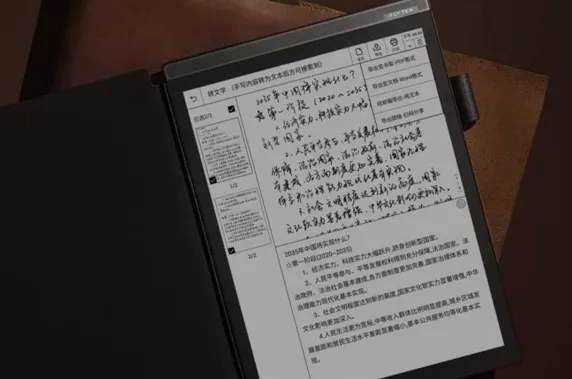
If you’re shopping for a “better way to write and read digitally,” you’ve probably seen two popular options everywhere: paper-like tablets (usually iPads or Android tablets with matte screen protectors) and E-Ink tablets. They look similar at first glance, but in daily use, they feel and behave vastly differently. So which one do you actually need?
In the guide,we willcompare paper-like and E-Ink tablets through real-world use, focusing on writing experience, eye comfort, reading performance, and key scenarios like note-taking and productivity, helping you choose the right tablet for your work, study, and thinking habits.
Why Do So Many People Struggle to Choose Between Paper-Like and E-Ink Tablets?
When choosing between the two types of products, we want both the versatility of a tablet and the focus of a physical notebook. People are confused because both claim to be “paper-like,” but they achieve it in different ways. Paper-like tablets are high-speed devices; in essence,they are powerful iPads equipped with textured screen protectors. While they successfully simulate the feel of paper, they are still bright, multifunctional tablets that can easily lead to digital distractions.
E-Ink tablets use physical ink particles; they look like paper and are easier on the eyes, but they run more slowly. We feel troubled because we worry that E-Ink functionality is too limited, while also realizing that paper-like tablets don’t truly prevent us from getting distracted.
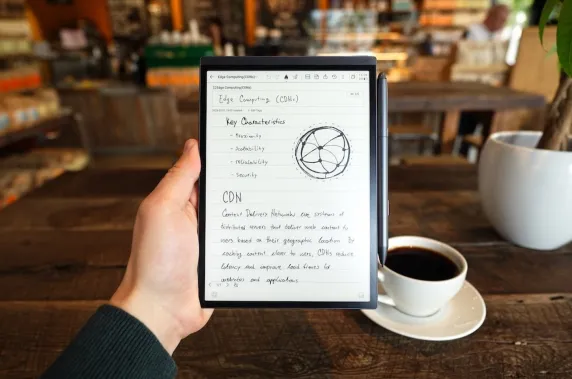
What Is a Paper-Like Tablet and How Does It Work?
A Paper-Like tablet is usually a high-performance LCD or OLED tablet (like an iPad Pro or Samsung Galaxy Tab)featuring a matte, textured screen or a specialized screen protector.
Technically, these devices rely on standard backlighting and high refresh rates that often reach 120Hz for fluid movement. The real magic lies in the surface, which is chemically etched or coated with microscopic peaks and valleys to create physical friction against a stylus. Ultimately, the vibe is that of a powerhouse computer that simply happens to feel like a tactile sketchbook.
What Is an E-Ink Tablet and How Does It Work?
An E-Ink tablet utilizes a completely different display technology known as an Electrophoretic Display. Instead of using pixels that emit light, the screen contains millions of tiny microcapsules filled with black and white pigments that move to the surface in response to an electric charge to form text and images. The magic of this technology is that it reflects ambient light like physical paper rather than projecting light directly into your eyes, and it only consumes power when the image actually changes. This creates a vibe of a piece of digital paper that boasts incredible battery life and remains comfortable for your eyes even after hours of use.
What Are the Real Differences Between Paper-Like and E-Ink Tablets?
Choosing between the two depends on whether you value raw performance or visual comfort more. This high-density comparison provides an intuitive analysis of technical trade-offs such as display characteristics, battery life, and writing feel, helping you make a decision.
|
Feature |
Paper-Like (LCD/OLED + Matte) |
E-Ink Tablets (Digital Paper) |
|
Display Tech |
Emissive (Backlit) |
Reflective (Ambient Light) |
|
Eye Strain |
Moderate (Blue light exposure) |
Very Low (Paper-like comfort) |
|
Refresh Rate |
Super Smooth (60Hz–120Hz) |
Low (Ghosting/Lag possible) |
|
Battery Life |
1–2 Days |
Weeks |
|
Colors |
Full Spectrum (Millions of colors) |
Grayscale (Color E-Ink is muted) |
|
App Support |
Full App Stores (Netflix, Games) |
Focus-oriented / Essential apps only |
|
Writing Feel |
Simulated friction on glass |
Deep, tactile "ink" sensation |
When Should You Choose Paper-Like Tablets vs. E-Ink Tablets?
Understanding the tech is one thing, but seeing how it fits into your daily routine is another. Here is how both tablets perform across various professional and academic scenarios.
Note-Taking in Meetings, Classes, and Brainstorming
If your note-taking involves heavy multitasking, like switching between a Zoom call and a notebook, the Paper-Like tablet wins. However, for pure focus, the E-Ink tablet is superior because it removes the temptation of notifications and social media.
Long Reading Sessions (Books, PDFs, Research Papers)
The best E-Inktablet is the undisputed king here. Because E-Ink doesn’t flicker and doesn't emit direct light, you can read a 50-page research paper without visual fatigue. It is the closest thing to reading a physical book.
Annotation, Planning, and Knowledge Management
If you are marking up complex medical diagrams or color-coded architectural plans, a Paper-Like LCD tablet is necessary for its color accuracy. If you are a minimalist planner who sticks to writing journals or text-heavy PDF reviews, E-Ink provides a more immersive and focused experience.
Creative Work: Sketching vs. Structured Writing
Sketching: Artists usually prefer Paper-Like LCDs for the instant response and color blending.
Structured Writing: Writers often prefer E-Ink because the lack of glow allows them to stare at the screen for hours while drafting a manuscript withoutvisual fatigue.
Daily Tablet Tasks and Multitasking Needs
If you need to edit video, browse high-res photos, or watch YouTube, a Paper-Like LCD is your only real option. E-Ink is too slow for video and the grayscale (or muted color) isn't designed for media consumption.
Which E-Ink Tablet Works Best for Note-Taking and Productivity-Oriented Users?
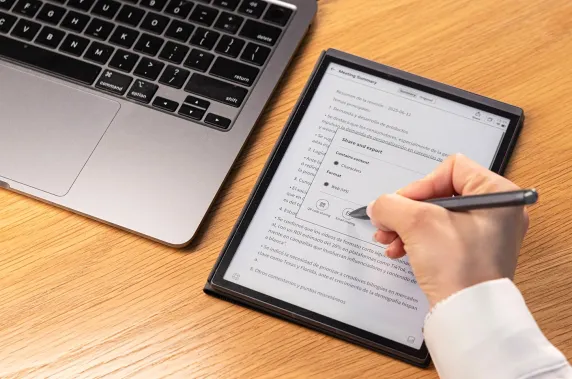
If you've decided that E-Ink is your path, the market is crowded. However, for those who need a professional device, the iFLYTEK AINOTE 2 stands out as a productivity powerhouse.Unlike normal tablets, the iFLYTEK AINOTE 2 is designed for the pure and immersive workspace. It features:
The World’s Thinnest AI Design:Only 4.2mm thin, this 10.65-inch, 300PPI screen offers a lightweight, paper-like reading experience that is perfectly easy on your eyes.
GPT-5 Powered Productivity:Using GPT-5, it summarizes handwriting to text across 133 languages with incredible professional accuracy.
Seamless Professional Ecosystem:Running Android 14, it syncs mind maps and calendars across all your devices while ensuring your notes stay private and secure.
Low latency & Instant response: Smooth page turns, fluent typing, and natural handwriting. Actions feel fluid, with minimal lag to slow you down.
80+ Note Templates:With 80+ templates for meetings, projects, and brainstorming, it provides inspiration every time you sit down to create.
Conclusion
Ultimately, the choice depends on performance and experience. If you need a versatile, high-speed device suitable for video and art, and prefer a textured surface over smooth glass, then a paper-like tablet is the right choice. If your main focus is reading and deep work, an E-Ink tablet is ideal. For those who want to avoid the glare of digital screens and return to a more focused, paper-like way of thinking,the iFLYTEK AINOTE 2 is perfect.
FAQs
1. Is a paper-like screen really better for your eyes?
While matte protectors reduce glare and squinting, they remain backlit. For true relief from eye strain or photophobia, only E-Ink screens eliminate light exposure.
- Is an E-Ink tablet a complete replacement for a regular tablet?
No. Think of an E-Ink tablet as a replacement for your notebook and your books, not your iPad. You won't be scrolling TikTok or editing 4K video on an E-Ink device.
3. Does adding a paper-like screen protector make everything the same?
Not quite. Adding a matte protector to an iPad increases friction, but it also slightly “blurs”the screen and can wear down your stylus tips faster. It doesn't change the underlying refresh rate or the light emission of the device.
4. Do all E-Ink tablets feel the same when writing?
Definitely not. The “feel” depends on the screen coating and the stylus tip material. Some feel like a “felt tip on paper” (like iFLYTEK), while others feel more like "pencil on plastic."
5. Which Type of Tablet Is Best for Your Role or Lifestyle?
Students: Paper-Like LCD (for versatility and color).
Researchers/Lawyers: E-Ink (for heavy reading and eye health).
Graphic Designers: Paper-Like LCD (for color accuracy).
Executives/Managers: E-Ink (for meeting notes and distraction-free planning).



